Posts

Showing posts with the label server 2008 R2

How to Create Folder, Share Folder and Permission Using Batch File
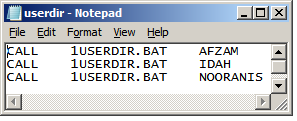
Image
1. Type call, 1userdir.bat and user name 3 teacher bellow and save as batch file, say userdir.bat ____________________________________ CALL 1USERDIR.BAT AFZAM CALL 1USERDIR.BAT IDAH CALL 1USERDIR.BAT NOORANIS __________________________ 2. Type one more batch file contain information about create folders, share folders and permission folder to user and admin (pentadbir). Save this file, say 1USER1DIR.BAT. _____________________________________________________________ md F:\GURU\DATA\%1 rmtshare \\dea2191si001\%1 = f:\GURU\DATA\%1 /GRANT "dea2191\pentadbir":f /GRANT "dea2191\%1":f xcacls F:\GURU\DATA\%1 /e /g pentadbir:f %1:f /r everyone ______________________________________________________ Note: F - partition GURU\DATA - Guru - folder, data is sub folder to guru Dea2191 - domain name of server (application server) md F:\GURU\DATA\%1 - create folder to 3 teachers, %1 - variable for teacher. Second line - create shared permission to teachers and give full permission...

How to Create User Using Batch File

Image
1. Type user name, full name, password, comment, home drive, home path, profile and script (press ctrl - to see hidden file) in the MS Excel. Save your file as usert.bat (any name) in folder, say createaccount. Here I will show how to create 3 users using batch file. User Name Full Name password Comment Home Drive Home Path Profile Script AFZAM NORAFZAM BT JUSOH guru2011 Practical's Teacher U: \\DEA2191SI001\AFZAM loging.bat IDAH HAMIDAH MAT HASSAN guru2011 Practical's Teacher U: \\DEA2191SI001\IDAH loging.bat NOORANIS NOORANIS BT MOHAMAD HALMI guru2011 Practical's Teacher U: \\DEA2191SI001\NOORANIS loging.bat Note : DEA2191SI001 - server name (application server), Profile - leaving blank (speed up at login's time ) 2. Copy adduser.exe form this link (adduser_x86.exe don't work, please find adduser.exe) and save same folder, folder createaccount. 3. Click start button, type cmd in the search program and file's box. 4. Command window appear. Type di...